
Find a contractor
Search ContractorsNearMe.ai by trade and location, filter results, read a contractor profile, and understand what Verified and the trust badges mean.
ContractorsNearMe.ai is BuildX’s public contractor directory, with about 140,000 active profiles. Search it at contractorsnearme.ai/search. Anyone can search and read profiles without an account.
What you can do
- Search by job, trade, and location, within a radius you choose.
- Filter by rating, Verified Only, and business classifications.
- See results as a list or on a map.
- Open a profile to read reviews, services, photos, and license details.
- Request Quote, Message, or Call a contractor.
- Save or Follow contractors once you’re signed in.
Search
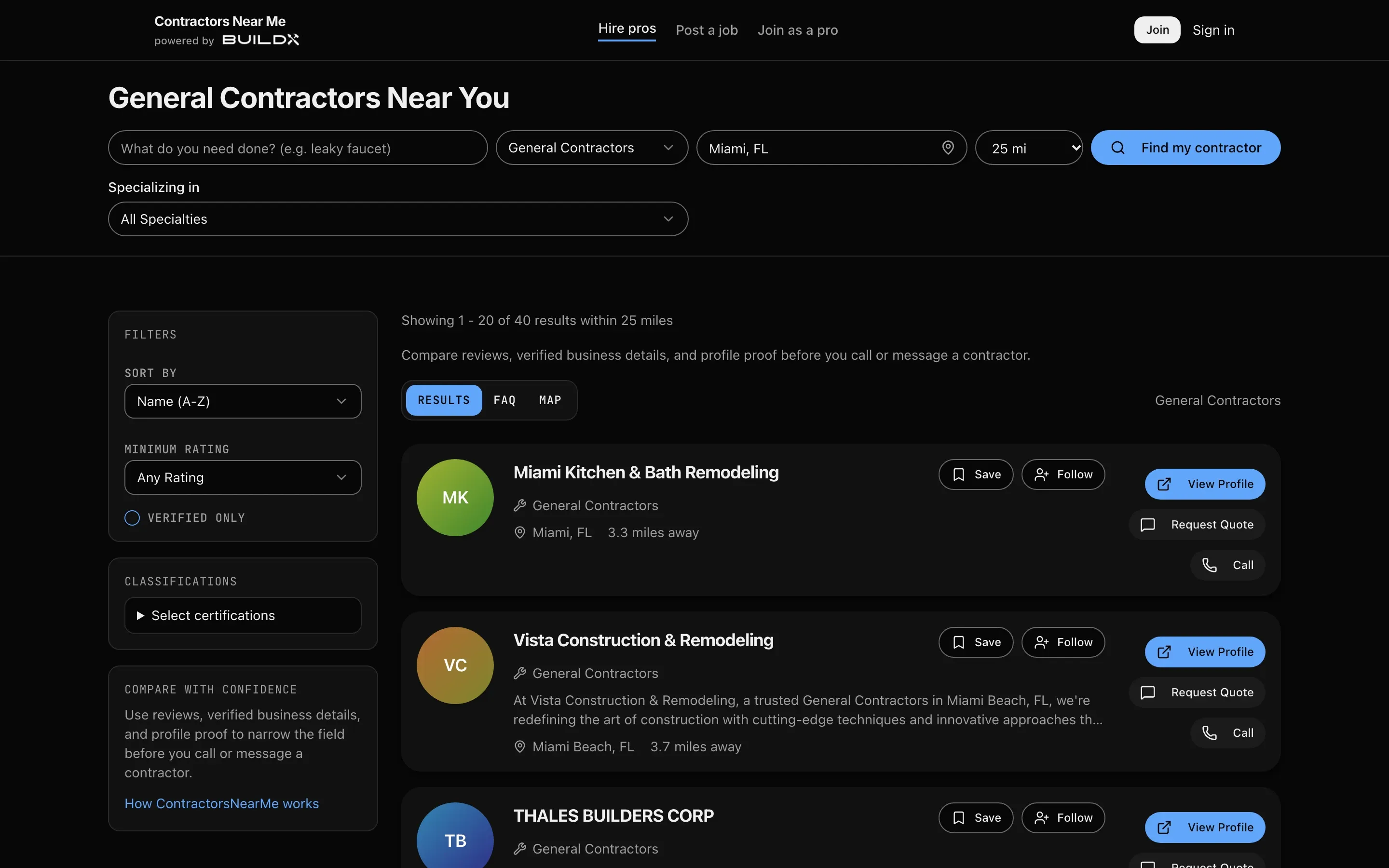
- Go to contractorsnearme.ai/search and stay on the Find Companies tab.
- In Search, describe the job (“What do you need done? (e.g. leaky faucet)”).
- Pick a Service Type, or leave it on All Trades. After you pick a trade, Specializing in lets you narrow it further.
- Enter Location (your town or ZIP), or use the locate button.
- Set the Radius (5 to 200 miles; the default is 25).
- Click Find my contractor.
You can also browse by trade at contractorsnearme.ai/trades or by category at contractorsnearme.ai/categories. From a buildx.pro calculator, Find Contractors opens the directory for that trade.
Filter and sort
Results have three tabs: Results, FAQ, and Map. On a computer, the sidebar has:
- Sort By: Name (A-Z), Relevance, Distance, or Rating
- Minimum Rating: Any, 3+, 4+, or 4.5+
- Verified Only
- Classifications: Diversity, Veteran, Labor, Size, Disability, Environmental
Each result shows the rating, how many miles away the contractor is, and View Profile, Request Quote, and Call. If nothing matches, you’re offered to widen to 50 miles, post the job instead, or relax filters.
Read a profile
The top of a profile shows the company name, trade, city, rating, a Verified pill if the license checked out, and the contractor’s ID link (contractor.id/<handle>). Below are tabs: Overview, Services, Reviews, Photos, and, when the contractor has added them, Videos, Deals, and Updates.
Buttons: Save, Follow, Message (jumps to the quote form), Call, and Write Review.
What Verified and the badges mean
- Verified License: the license number matched the official state licensing board record, and that record reads active.
- Insured and Bonded: shown only where the state publishes those details.
- Top Rated: an average of 4.5 or higher from at least 5 reviews.
- Other badges you may see: Active Profile, Fast Responder, Licensed, MWBE Certified, Union Affiliated.
Verification is a license-record check. It is not a background check or a review of the contractor’s work. Full details are at contractorsnearme.ai/how-we-verify.
Save and follow
Click Save or Follow on a profile or search result. Both need you to be signed in. Saved and followed contractors appear on the Saved page of your account, where you can also shortlist them and add notes. See Your ContractorsNearMe account.
Good to know
- Not every profile has been claimed by the business it lists. Call or message to confirm details before you rely on them.
- Reviews you write go through moderation before they show. See Your ContractorsNearMe account.